
Aetec Automation Demo Helicoil + Pin Web Simulator
Aetec logo Aetec simulation demo
Interactive proof-of-concept demo

Automated Helicoil Installation Workstation Simulator

A professional Cloudflare Pages-ready webapp for demonstrating an automated line, validating the CAD/CAM-to-toolpath concept, and presenting a final simulator architecture for high-mix, low-volume parts.

Automation challenge

From manual counting and installation to a traceable robotic workstation.

This demo converts a manual helicoil and pin installation workflow into a visual PoC: station map, simulated part loading, vision inspection, feeder/tool selection, robotic insertion, QA verification, rejection logic, and MES-style traceability output.
Current pain points
  • Missing helicoils from manual counting or oversight.
  • Cross-threading, thread jump, misalignment, and rework damage.
  • Pin installation damage and missed cosmetic defects.
  • Manual lifting/flipping for multi-surface access.
Proposed workstation
  • 6-axis robot with servo insertion tool.
  • Vision inspection and hole detection.
  • Helicoil feeder and buffer station.
  • Quick-change tooling for insert and pin sizes.
Interactive digital twin

3D-style toolpath preview, quick-change logic, and cycle-time estimator

Use the controls to switch between PoC demonstration and final simulator behavior. The viewer generates a potential toolpath, simulates tool changes, and exports the operation plan as JSON or CSV.

Aetec Workcell Preview Demo part loaded · waiting for toolpath
Tool: none 3D view Idle
Hole / insert point Generated path Robot + active tool Vision / QA
Auto cycle--estimated seconds
Manual baseline--current-process estimate
Improvement--cycle-time reduction
Tool changes--quick-change events
QA checks--vision / torque / depth
Travel--robot path length
Generated operation plan

Robot, feeder, vision, tool-change, and QA sequence

0 operations
# Station Operation Tool Target QA / Signal Time
Generate a toolpath to populate the operation plan.
CAD/CAM and toolpath format

Recommended input/output structure for the final simulator

The current webapp supports CSV/JSON feature import for PoC testing. The final phase can add native CAD/CAM parsing, feature recognition, collision checks, and robot-specific post processors.

01

Import

STEP/STL/DXF or CAM-exported CSV/JSON with hole coordinates, normal vectors, insert type, thread size, depth, and tolerance.

02

Recognize

Identify helicoil features, pin holes, blind holes, access faces, fiducials, datum references, and operation constraints.

03

Plan

Choose insertion tool, feeder cartridge, approach vector, torque/depth recipe, tang-removal step, and QA rule.

04

Optimize

Minimize robot travel and tool changes while preserving inspection gates, safety zones, fixture limits, and sequence constraints.

05

Simulate

Render robot reach, possible collision envelope, fixture clearances, camera views, feeder status, and toolpath playback.

06

Post + Trace

Export robot program, operation traveler, MES data, QA record, reject reason, and final part report.

CSV feature format

id,x,y,z,type,size,depth,torque,face,normal_i,normal_j,normal_k
H001,-140,60,22,helicoil,M4,9,0.45,top,0,0,1
P002,-80,60,22,pin,DOWEL_4,7,,top,0,0,1

Toolpath JSON concept

robot-agnostic
{
  "partId": "demo-large-plate",
  "recipe": "helicoil-pin-auto-v1",
  "operations": [
    {"op":"toolChange","tool":"HELICOIL_M4","slot":2},
    {"op":"insert","target":"H001","xyz":[-140,60,22],
     "normal":[0,0,1],"torqueNm":0.45,"depthMm":9},
    {"op":"verify","signals":["vision","torque","depth"]}
  ]
}
Robotic conceptual design updated into webapp modules

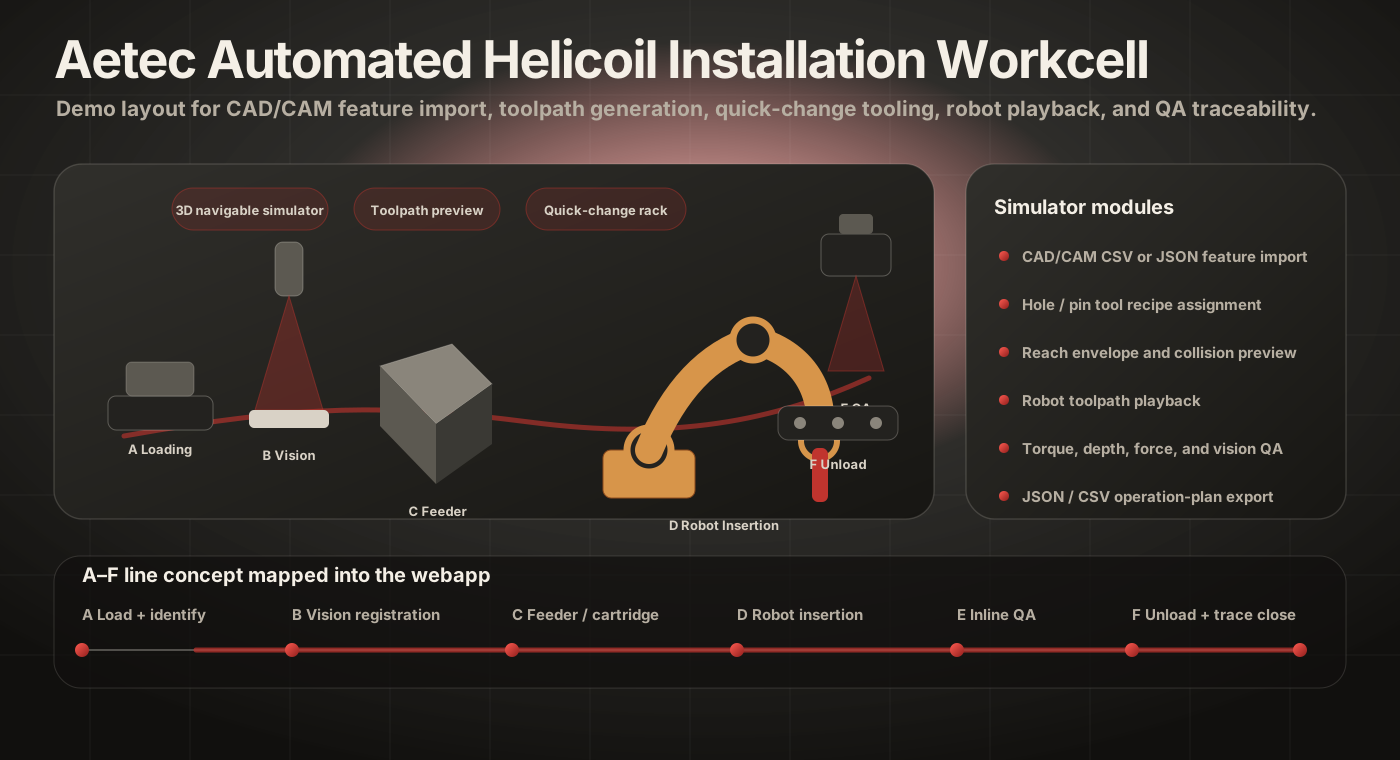
Automated line A–F, mapped directly from the proposal concept

Reference automation concept

Automated Helicoil Installation Workstation

The webapp converts the concept into simulator controls, station status cards, cycle-time logic, CAD/CAM format, and the final implementation roadmap.

Automation concept for helicoil installation workstation
Implementation roadmap

PoC webapp now, final simulator next

Phase 1

Proof of Concept Webapp

  • Professional landing page and automation challenge summary.
  • Interactive demo geometry with 3D-style station view.
  • Generated potential toolpath and sequence table.
  • Quick-change tool rack and feeder logic.
  • Cycle-time, travel, QA, and improvement KPIs.
  • CSV/JSON import and export for early CAD/CAM validation.
Phase 2

Engineering Simulator

  • Native STEP/DXF/CAM import through a CAD feature engine.
  • Hole recognition, face orientation, datum mapping, and operation recipes.
  • Robot reach envelope, fixture collision, tool clearance, and part-flip strategy.
  • Tool changer, feeder cartridge, torque/depth recipe, and tang-removal modules.
  • Robot-brand post processor and dry-run validation report.
Phase 3

Production HMI + MES

  • Operator dashboard, diagnostics, manual override, and maintenance screen.
  • Barcode/RFID traveler, recipe loading, process sign-off, and batch traceability.
  • Torque/depth curves, camera evidence, reject handling, and quality analytics.
  • Cloud database/API layer with role-based access and audit logs.
  • Dashboard for throughput, downtime, first-pass yield, and station bottlenecks.